Time Zone Converter
Time Zone Converter to find the time difference between various time zones and cities around the world. Experience the classic time zone conversion table designed to calculate time differences in hours, and streamline your international scheduling and collaborations.
UTC
UTC+0
10:00pm
12am
30
1am
30
2am
30
3am
30
4am
30
5am
30
6am
30
7am
30
8am
30
9am
30
10am
30
11am
30
12pm
30
1pm
30
2pm
30
3pm
30
4pm
30
5pm
30
6pm
30
7pm
30
8pm
30
9pm
30
10pm
30
11pm
30
Europe/London
GMTUnited Kingdom+1
11:00pm
1am
30
2am
30
3am
30
4am
30
5am
30
6am
30
7am
30
8am
30
9am
30
10am
30
11am
30
12pm
30
1pm
30
2pm
30
3pm
30
4pm
30
5pm
30
6pm
30
7pm
30
8pm
30
9pm
30
10pm
30
11pm
30
THU12am
30
Asia/Tokyo
JSTJapan+9
7:00am
9am
30
10am
30
11am
30
12pm
30
1pm
30
2pm
30
3pm
30
4pm
30
5pm
30
6pm
30
7pm
30
8pm
30
9pm
30
10pm
30
11pm
30
THU12am
30
1am
30
2am
30
3am
30
4am
30
5am
30
6am
30
7am
30
8am
30
Night
Morning/Evening
Business Hours
How does the timezone converter work?
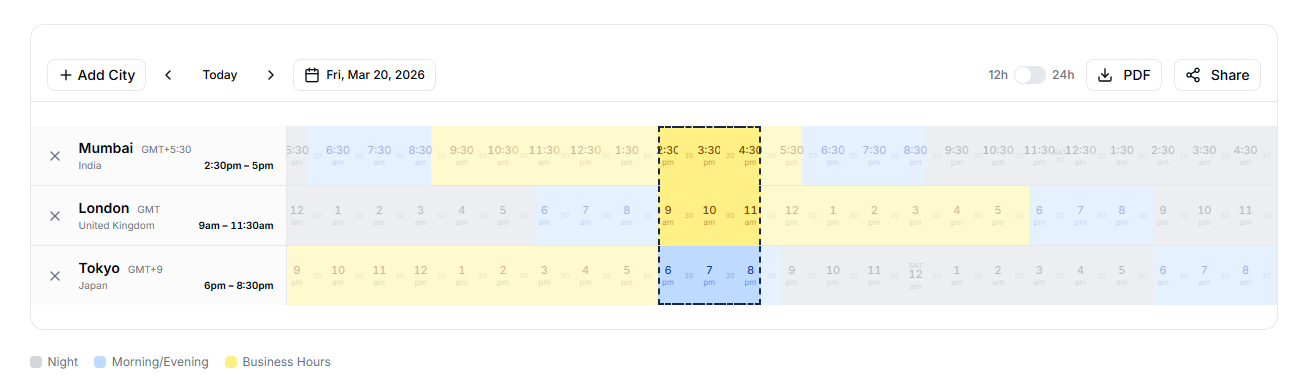
The timezone converter tool by DaySchedule displays a 24-hour timeline for each selected city, making it easy to convert time between multiple time zones. The timeline is color-coded by time of day. Gray indicates night time (12am-6am), light blue shows morning/evening (6am-9am & 6pm-9pm), and yellow highlights business hours (9am-6pm). Simply add cities using the "Add City" button and compare world clock times across all timezones.
How do I select and compare meeting times?
Click on any time slot to select it - the selected column highlights across all timezones so you can instantly see the corresponding local times. Click anywhere again to deselect. You can also click and drag to select a range. Each slot represents 30 minutes for precise meeting planning. The city panel on the left updates to show the selected time range for each timezone, helping you schedule meetings across time zones.
Can I share my timezone comparison with others?
Click the Share button in the toolbar to generate a URL containing your selected timezones, time range, date, and clock format. Anyone opening that link sees the exact same timezone comparison - ideal for remote teams and global meeting scheduling.
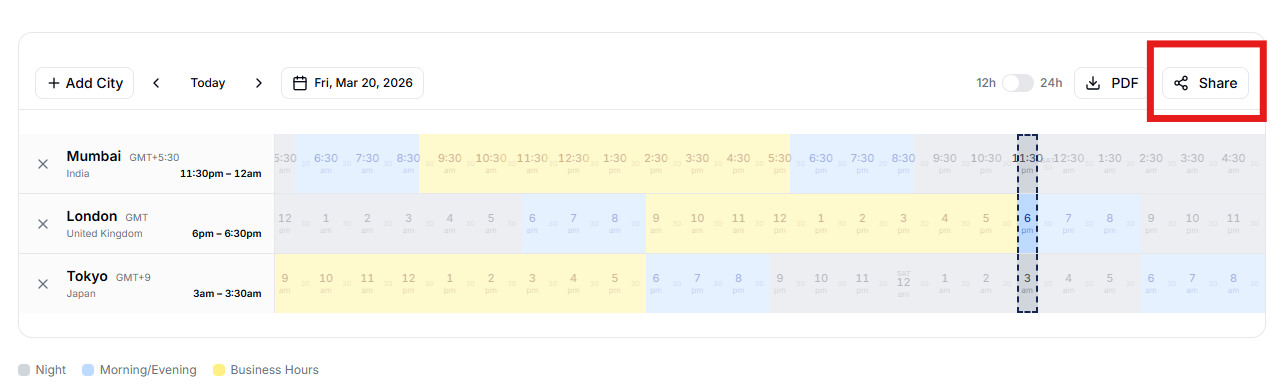
Example: Add New York, London, and Tokyo, select 2pm-4pm UTC, then hit Share. Your client sees 9am-11am in New York, 2pm-4pm in London, and 11pm-1am in Tokyo.
Example: Add New York, London, and Tokyo, select 2pm-4pm UTC, then hit Share. Your client sees 9am-11am in New York, 2pm-4pm in London, and 11pm-1am in Tokyo.
Does this tool account for Daylight Saving Time (DST)?
Yes. The converter uses the IANA timezone database via date-fns-tz, which automatically handles daylight saving time (DST) changes. When clocks move forward or backward, the timezone converter adjusts offsets accordingly
How do I find the best meeting time across time zones?
Look for columns where all timezones show yellow (business hours). Click on those columns to select a meeting window. For example, if you're coordinating between San Francisco (PST) and Berlin (CET), the overlapping business hours are roughly 8am-10am PST / 5pm-7pm CET.
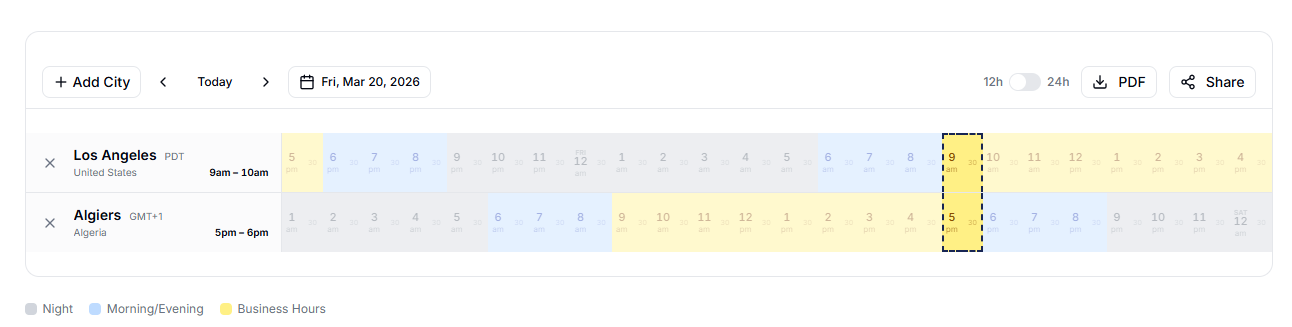
This will help you quickly find the best time for international meetings using a world clock or timezone converter.
This will help you quickly find the best time for international meetings using a world clock or timezone converter.
Explore more
- Time Slot Booking System
- Age Calculator
- Timetable Generator
- Add to Calendar Link Generator for Events
- Event QR Generator
- UPI QR Code Generator
- Unix Timestamp Converter
- Time Difference Calculator
- Time Tracker
- Mailto Link Generator
- Banner Generator for Events, Webinars & Social Media Pages
- ISO Time Formatter
- GMT Timestamp
- Age Difference Calculator
Create your free appointment booking website
Start accepting bookings online with your own branded scheduling page. No coding required - set up, share your link, and get booked instantly.
4.9
Trusted by 25,000+ customers